
BedrockTogether (Pro)
BedrockTogetherTools
4.754.00 Reviews
- Version
- 1.26.0
- Installs
- 10.00K
- Age Rating
- Everyone
Screenshots
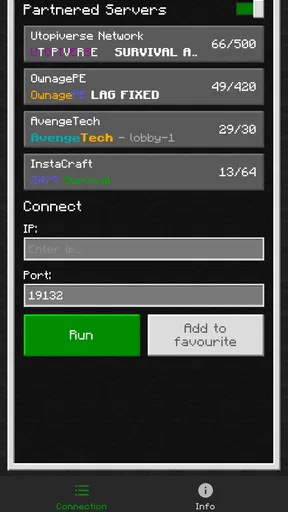
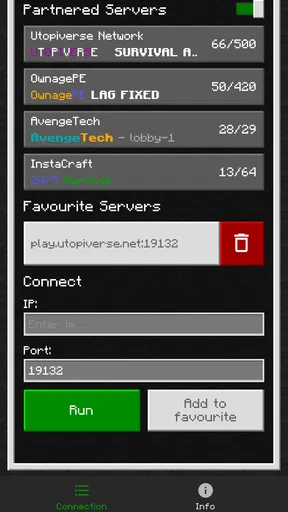
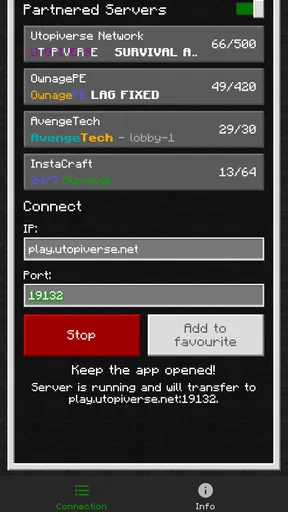
Our Review of BedrockTogether (Pro)
 Analysis by Appyee
Sharing a Minecraft session across a household can be less about finding a server and more about getting everyone onto the same one at the right time. I see BedrockTogether (Pro) as a practical tool for that particular job: it helps Bedrock players on Xbox or PlayStation reach a server through a phone, rather than asking everyone to play on the same kind of device. It is most useful when one person is happy to handle the connection steps and the rest just want to get into the game.
One phone can help coordinate a shared session
Picture a familiar evening: one person is on a console, another has a tablet nearby, and a friend is waiting to join the same Bedrock server. The phone running the app can act as the connection point, so the console player has a route to a server that may not be as straightforward to enter from the console itself. That makes the app useful as a household helper, not a replacement for Minecraft or a place where the play itself happens.
That distinction matters. I would not install it expecting a server browser full of ready-made worlds, a chat service, or a way to manage everyone’s Minecraft account. Its job is narrower: helping with server access. If your group already joins the same world easily, adding a separate phone step may not improve anything. But when the console’s normal options are the obstacle, having one person manage the bridge can save repeated fiddling with addresses and menus.
Keep the setup role clear
In a shared home, I would choose one person to enter and maintain the server details rather than passing the phone around while people are waiting. If you use the saved-server option, check the entry before a group session and keep the details somewhere the household’s organizer can find them. This is a small routine, but it avoids turning the start of game night into a hunt for an address or a debate about which entry is current.
The app does not remove every dependency in the chain. The phone, console, game, and server still need to work together, and a connection problem may come from outside the app. If a server is unreachable, I would first check that the address is correct and that the game and server are compatible, then confirm the phone and console are on a suitable network before repeatedly restarting everything. Treating the app as one part of the connection path makes troubleshooting more sensible than assuming it can fix every multiplayer issue.
Useful coordination, not household account management
BedrockTogether can simplify the moment of joining, but it is not a family dashboard. I would not expect it to set play schedules, supervise accounts, approve friends, or control what happens once someone is inside a server. Those boundaries belong in the game, on the console, and in the household’s own rules. A parent or caregiver should still check which server the child is joining and who else is playing there.
That makes the app better suited to a supervised, shared session than to handing a younger player an unfamiliar server address and assuming the connection tool makes the destination safe. The age rating is Everyone, but that does not make every server or every multiplayer interaction appropriate for every child. In my view, the useful household habit is to decide on the server first, keep the connection steps with a trusted person when needed, and let the child know who is expected to be in the game.
Where it fits among the alternatives
Compared with entering a server through the console’s usual menus, the app adds a phone-based step, but that step is the point when the console route does not offer the access your group needs. Compared with simply playing on a device that already has a direct way to join, it is less convenient: another device has to be available and someone has to operate it. I would use it when the console is the preferred screen and a phone can help make the server reachable, not as a universal improvement to every Minecraft setup.
It is also worth separating connection help from server choice. The app may make the route easier, but it does not decide whether a server is active, suitable, or a good match for your group. If the server has its own joining requirements, those still matter. For a household that plays on the same private world through a normal invitation, the standard in-game method may remain the simpler option; for a group trying to reach a specific Bedrock server from Xbox or PlayStation, this tool has a clearer role.
Connecting Across Platforms Made Easy
First off, let's talk about what this app actually does. BedrockTogether (Pro) is all about making it super simple to join Minecraft servers on different platforms. Whether you're on an Android or iOS device, this app bridges those gaps, allowing you to connect with friends who might be on consoles or PCs. It’s like a universal adapter for all your Minecraft adventures!
Setup and User Interface
Setting up the app is a breeze. You download it, fire it up, and you’re greeted with an interface that’s clean and intuitive. Even if you’re not the most tech-savvy person out there, you’ll find your way around without breaking a sweat. The UI is designed with simplicity in mind, which is always a plus in my book. Plus, there’s a handy guide to walk you through the initial setup, which I found super helpful.
Features That Stand Out
One of the coolest features of BedrockTogether (Pro) is its ability to save your favorite servers. No more scrambling to remember server addresses or having to re-enter them every time you want to play. Just save them once, and you’re good to go. Another nifty feature is the quick join option, which lets you dive straight into the game without any fuss.
Oh, and did I mention the automatic updates? The app keeps itself up to date, ensuring you always have the latest features and improvements at your fingertips. This is a lifesaver, especially when Minecraft updates frequently and you don’t want to be left out.
Performance and Reliability
Now, onto performance. I was pleasantly surprised by how smoothly everything runs. No lag, no crashes, just seamless connectivity. The developers have clearly put a lot of effort into optimizing the app, and it shows. Whether you're playing for a few minutes or a few hours, the experience remains consistently smooth.
Community and Support
One aspect that often gets overlooked in app reviews is the community and support, but it’s crucial, right? With BedrockTogether (Pro), you get access to a fantastic community of fellow players. If you ever run into issues, there’s a support team ready to help, and they’re pretty responsive. I had a minor hiccup and reached out to them, and they got back to me quickly with a solution.
Choosing it for your setup
The practical question is whether the extra phone step earns its place in your routine. This is a paid tools app from BedrockTogether, priced at $3.49, so I would decide based on a real need to join servers from a console rather than buying it just to experiment with Minecraft multiplayer. Its average is 4.7 from around 600 ratings, with 10K+ installs; that gives a useful sense of uptake, but the value for your home still depends on how often the console route causes trouble.
I would especially consider it for a household with an Xbox or PlayStation player who regularly joins a particular Bedrock server and has an Android or iOS phone available to help. It is a weaker fit if the phone is usually unavailable, if nobody wants to manage server details, or if everyone already plays on devices where joining is direct. The app’s current version is 1.26.0, and it runs on Android 8.0 or later; those are worth checking against the phone that would be used, particularly if it is an older spare device.
Small habits that make sessions smoother
For a recurring group, I would test the full route before inviting everyone: open the app, select the intended saved server, then confirm the console can see and join it. Doing that while nobody is waiting helps identify whether the address or the home network is the sticking point. Once it works, keep the server entry unambiguous—for example, distinguish a family server from a friend group’s server—so a quick tap does not send the console player to the wrong destination.
A second useful habit is to avoid changing several things at once when a connection fails. Check the server entry first, then the game and network, and only then retry the app. That makes it easier to identify the cause instead of repeating a full setup blindly. For a one-off session, the normal console joining options or an in-game invitation may be faster; for a recurring server that the console cannot conveniently reach, saving the details is where the app’s convenience becomes more meaningful.
The developer is BedrockTogether, and the app is rated Everyone. I would still treat server access as a separate decision from age suitability: a general rating for the utility does not assess every world a player might join. For younger household members, I would choose the destination and agree on who they will meet before handing over the controller. For older players who already understand the server they are joining, the app can simply stay with the person who coordinates the session.
A measured household verdict
My recommendation is conditional but straightforward: choose it when a phone-assisted route solves a recurring Xbox or PlayStation server-access problem, and skip it when your group’s existing joining method already works. BedrockTogether is a focused bridge, not an all-purpose Minecraft companion, and that narrow purpose is both its strength and its limit. The app has 54 reviews alongside its ratings, but the decision I would make is still based on your own setup: one successful test with the intended phone, console, and server tells you more than a general popularity figure.
So, why should you consider downloading BedrockTogether (Pro)? It’s all about enhancing your Minecraft experience. If you love playing with friends across different devices or simply want a more streamlined way to access your favorite servers, this app is worth checking out. It’s packed with features that make multiplayer gaming more accessible and enjoyable.
In conclusion, if you’re a Minecraft enthusiast looking to expand your horizons and simplify your gaming life, BedrockTogether (Pro) is a must-have. It’s not just an app; it’s a tool that brings players together, no matter what device they’re on. So, go ahead, give it a try, and dive into the endless possibilities of multiplayer Minecraft.
Verdict
Strengths of BedrockTogether (Pro)
- Easy connection setup for Minecraft multiplayer.
- Supports both Android and iOS platforms.
- User-friendly interface with clear instructions.
- Regular updates ensure compatibility with new versions.
- No need for additional hardware or software.
Limitations of BedrockTogether (Pro)
- Only supports Bedrock Edition of Minecraft.
- May experience occasional connectivity issues.
- Requires stable internet for optimal performance.
- Ads in the free version can be intrusive.
- Limited features without the Pro version.
Similar Picks in This Category
View All
Google LLC4.0

Gboard - the Google Keyboard
Google LLC4.5

Google Play services
Google LLC4.3

Google Play Store
Google LLC4.9

Files by Google
Google LLC4.5

SHAREit: Transfer, Share Files
Smart Media4U Technology Pte.Ltd.4.3
Frequently Asked Questions
What is BedrockTogether (Pro) and how does it work?
BedrockTogether (Pro) is an app designed to facilitate seamless multiplayer experiences for Minecraft Bedrock Edition. It allows players to easily join public servers or connect with friends by using the app to establish a local network connection. Once connected, users can enjoy an enhanced multiplayer experience without the need for additional hardware or complex setups.
Is BedrockTogether (Pro) compatible with all devices?
BedrockTogether (Pro) is compatible with most Android and iOS devices that support Minecraft Bedrock Edition. However, it is essential to ensure that your device meets the minimum system requirements for both the app and the game to avoid any performance issues. Always check for the latest app updates to maintain compatibility.
Does using BedrockTogether (Pro) require any additional purchases?
While BedrockTogether (Pro) itself may have a purchase price, it does not require additional in-app purchases to function. However, users must own a legitimate copy of Minecraft Bedrock Edition to use the app effectively. The app aims to enhance your existing gameplay without imposing further costs.
How secure is BedrockTogether (Pro) for online gaming?
BedrockTogether (Pro) is designed with user security in mind. It uses a local network connection to facilitate multiplayer gaming, minimizing exposure to potential online threats. However, players should always practice standard online safety measures, such as playing with trusted friends and avoiding sharing personal information in public servers.
What should I do if I encounter issues while using BedrockTogether (Pro)?
If you experience any issues while using BedrockTogether (Pro), start by checking the app's FAQ section or support page for troubleshooting tips. Ensure your device and game are updated to the latest versions. If problems persist, consider reaching out to the app’s customer support for further assistance, providing details about the issue and your device specifications.
